
# 随手记录
用于 旧系统数据迁移、图片清理、媒体库生成及媒体同步。
# Postman命令
http://ceshi.test/clearImg   //清除碎图
http://ceshi.test/old-mysql-img?token=786efab8ac1d9c16406bb18c8b9e26b8  //二次清除碎图

http://ceshi.test/old-mysql?oss=0&type=1   //填充字段
http://ceshi.test/old-mysql?oss=0&type=2   //填充数据
http://ceshi.test/old-mysql?oss=0&type=3   //留言数据导入
http://ceshi.test/old-mysql?oss=0&type=4   //关键词导入

http://api.xypt.top/old-mysql-img?token=526f380e07c212c4f78af9e4e4180869    //9.9.5以下同步媒体库图片
http://api.xypt.top/getMedia?yzm=4e0f0cab4e5baae3d5ef6a867469976e&token=1da4177402339b571411a58ee483a97c&xtoken=07fdf60e0687b1e05ab46f1ec4984c35    //9.9.5以上同步媒体库图片
# 阿里云数据库操作
https://dms.aliyun.com/?accounttraceid=51e3769f4bc8491c9e1cc4f66677b108ekyy (opens new window)
// 查询指定站点的所有视频文件(mp4格式)
SELECT * FROM `media` WHERE `token` = '47af009788ea0b6f764615ded0486cc1' AND extension = 'mp4';

// 查询后台媒体库中的存储大小  清除视频存储大小 “cur_video_size”
SELECT * FROM `sites` WHERE `id` = '12128'

// 查询指定站点 URL 包含 'data' 的媒体文件
SELECT * FROM `media` WHERE `token` = '47af009788ea0b6f764615ded0486cc1' AND url LIKE '%data%';
# 单独导入老站新闻数据
需要
xypt_news、xypt_newscate、xypt_tags3张表步骤1准备老站数据: 打开Navicat中导入老站的以下3张表
步骤2运行填充字段:
http://ceshi.test/old-mysql?oss=0&type=1接口,对老站表进行字段填充,使其符合新站数据结构步骤3重命名老站表:将填充好的老站表重命名,避免与新站表冲突
xypt_tags→xypt_tags1步骤4合并数据:运行接口
http://ceshi.test/old-mysql?oss=0&type=4将老站数据导入到新站表, 该接口会将以下数据合并到新站xypt_tags1表数据 → 插入xypt_tags表步骤5验证数据:验证xypt_tags表(新站数据 + 老站数据总数),xypt_tags1 (仅老站数据数量)
注意事项
oss参数:如果需要处理 OSS 图片路径,将oss=0改为oss=1数据导入顺序:先处理 tags,再处理 newscate,最后处理 news(避免外键约束错误)
# ssh命令
scp -P 22 /f/code/ceshi/public/data.zip root@192.168.1.249:/root
// 拷贝 data.zip 到本地249服务器root目录

scp -P 8822 data.zip root@47.114.142.16:/var/www/html/cloud-platform/api/public
// 拷贝 data.zip 到远程服务器 /var/www/html/cloud-platform/api/public 目录

ssh ali16
// 新窗口打开 链接远程服务器

cd ali16
//进入 16 服务器

cd  /var/www/html/cloud-platform/api/public
// 进入服务器目录

ll
// 查看目录文件

unzip data.zip
// 解压 data.zip

rm -rf data.zip data/
// 删除 data.zip 和 data 目录
# 虚拟主机下载证书:
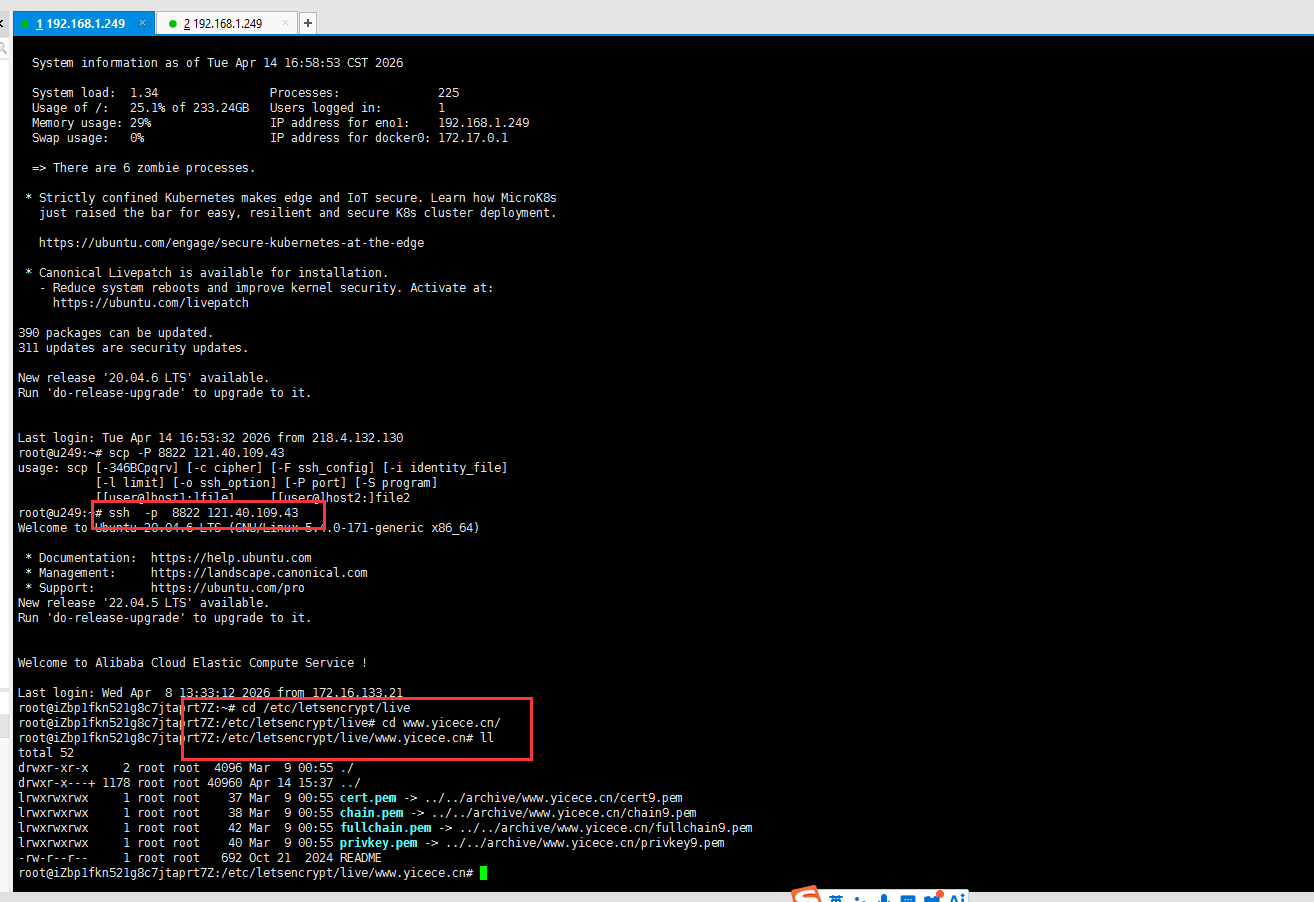
- 1、登录249服务器
ssh -p 8822 121.40.109.43   //连接站点服务器

cd /etc/letsencrypt/live  //进入目录

cd www.yicece.cn/   //继续进入域名目录

ll              //查看目录所有内容
- 2、重新打开窗口进入249服务器
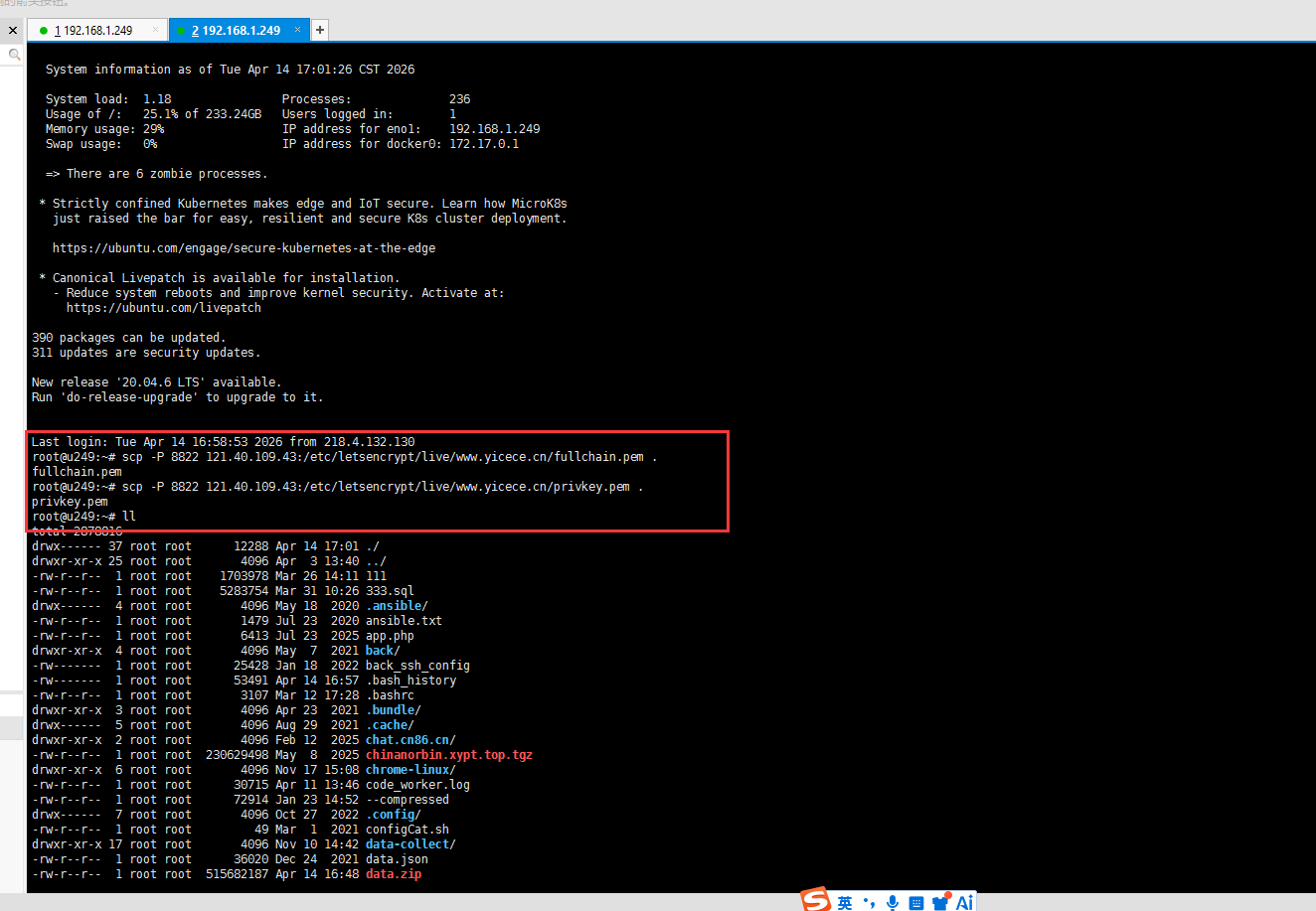
- 3、从服务器向另一台服务器复制证书(.)是当前目录
scp -P 8822 121.40.109.43:/etc/letsencrypt/live/www.yicece.cn/fullchain.pem .

scp -P 8822 121.40.109.43:/etc/letsencrypt/live/www.yicece.cn/privkey.pem .
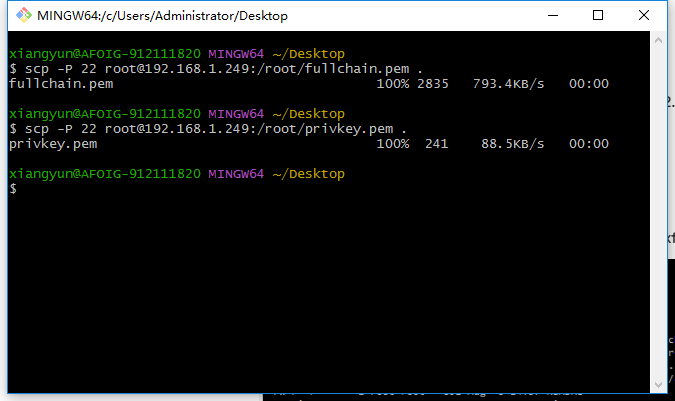
- 4、桌面打开git 从服务器把证书下载到桌面
scp -P 22 root@192.168.1.249:/root/fullchain.pem .   //进入本地下载

scp -P 22 root@192.168.1.249:/root/privkey.pem .   //进入本地下载
# 常用阿里云服务器IP
阿里云(香港)
2876

47.242.206.101

s2.myxypt.com
---
2?vCPU?4?GiB?(I/O优化)
2020-08-24?14:02:28
2027-08-24?23:59:59
阿里云(杭州)
2736?/?3690

120.55.51.124

s1.myxypt.com
3000
8?vCPU?16?GiB?(I/O优化)
2020-12-01?09:43:38
2022-11-25?23:59:59
西部数码(郑州)
1889

122.114.55.17

s3.myxypt.com
---
8?vCPU?16?GiB?(I/O优化)
2021-03-26?11:16:44
2027-04-24?23:59:59
阿里云(杭州架构)
1859

121.40.193.177

demo.myxypt.com
---
2?vCPU?4?GiB?(I/O优化)
2021-04-23?08:46:07
2030-04-20?23:59:59
阿里云(杭州)
1104?/?1500

101.37.79.212

s4.myxypt.com
---
1500
8?vCPU?16?GiB?(I/O优化)
2021-12-27?14:40:28
2027-12-24?23:59:59
阿里云(杭州)
1169?/?1640

121.41.17.184

s9.myxypt.com
---
1500
8?vCPU?16?GiB?(I/O优化)
2022-01-07?14:01:49
2027-08-31?23:59:59
阿里云(杭州)
1196?/?1643

47.97.218.155

s5.myxypt.com
---
1500
8?vCPU?16?GiB?(I/O优化)
2022-03-22?08:35:40
2028-03-17?23:59:59
阿里云(杭州)
1195?/?1654

47.111.131.54

s6.myxypt.com
---
1500
8?vCPU?16?GiB?(I/O优化)
2022-05-31?16:58:11
2028-05-31?16:57:56
阿里云(杭州)
1147?/?1643

47.99.70.53

s7.myxypt.com
---
1500
8?vCPU?16?GiB?(I/O优化)
2022-08-18?10:16:49
2027-08-18?23:59:59
阿里云(杭州)
1166?/?1624

47.99.34.245

s8.myxypt.com
---
1500
8?vCPU?16?GiB?(I/O优化)
2022-12-01?17:02:09
2027-12-01?17:01:43
阿里云(杭州)
1175?/?1649

121.196.209.238

s10.myxypt.com
---
1500
8?vCPU?16?GiB?(I/O优化)
2023-05-08?08:20:49
2026-05-06?23:59:59
阿里云(杭州小程序)
184

118.31.246.219

xcx.myxypt.com
---
2?vCPU?4?GiB?(I/O优化)
2023-08-24?23:59:59
2024-07-24?23:59:59
阿里云(杭州)
1004?/?1501

121.40.109.43

s11.myxypt.com
---
1500
8?vCPU?16?GiB?(I/O优化)
2024-05-08?23:59:59
2029-05-08?23:59:59
阿里云(美国硅谷)
92

47.251.23.227

us.myxypt.com
---
2?vCPU?4?GiB?(I/O优化)
2024-05-24?00:00:00
2028-05-24?00:00:00
阿里云(杭州)
460?/?665

47.110.86.190

s12.myxypt.com
---
1500
8?vCPU?16?GiB?(I/O优化)
2025-12-24?23:59:59
2028-12-24?23:59:59
# username
xiangyunpt HQLF3686hq#2024

homestead 127.0.0.1 2222

192.168.1.249 192.168.1.249 22
# translate 翻译
ssh -p 8822 47.75.182.2

cd translater

php -f t22.php prod &
# Delete Site 删除站点
ssh ali16

cd /var/www/html/cloud-platform/backend

php artisan delete:site s-lq28l17gxzippdtv
# gitee
- wuhanqq
- 6b4e2556f9c18a1e4f002b6dd01368c9
- 以后更新文档只需要 3步:
git add .
git commit -m "更新文档"
git push
- 代码就会同步到你的仓库:
https://gitee.com/wuhanqq/docs/ (opens new window)
# gitee拉取流程
# 1. 进入项目目录
cd F:\my-docs-latest

# 2. 检查当前分支
git branch --show-current

# 3. 如果不是 master,则切换
git switch master

# 4. 拉取最新代码
git pull --rebase

# 5. 修改项目文件

# 6. 查看修改
git status

# 7. 提交修改
git add .
git commit -m "更新文档"

# 8. 上传到 Gitee
git push
# gitee拉取流程简化
#拉取最新代码
git pull --rebase

# 修改文件
git add .
git commit -m "更新文档"
git push
# cdn 刷新预热
# 常用 Homestead 开发命令
1️⃣ 进入虚拟机
cd /d/Homestead
vagrant ssh
2️⃣ 启动虚拟机
vagrant up
3️⃣ 关闭虚拟机
vagrant halt
4️⃣ 重启虚拟机
vagrant reload
5️⃣ 重新加载配置
(修改 Homestead.yaml 后必须执行)
vagrant reload --provision
# 数据库信息(默认)
数据库:MySQL
host: 127.0.0.1
port: 3306
user: homestead
password: secret
database: homestead
# 常见问题
- 10.1以下版本不支持自动修复证书
- HQlf蜀道山